

Do you want to know which is the best router for Movistar, Vodafone, or Orange in 2022? Do you know which company has the best WIFI router?
Do you have problems with the internet connection with the router that your telephone operator has given you?
Can’t you configure all the parameters of your network at home to your liking?
Can’t install Cloudflare DNS because Movistar tells you that the 1.1.1.1 address is being used by your router? Do you want a good wifi 6 router?
You need to buy a neutral router for your home. You are going to increase your privacy from your operator… No telecommunications company offers an acceptable Wi-Fi router…
Which company has the best wifi router?
None… better buy yourself a good router to get the best Wi-Fi connection in your home. Don’t hesitate for a minute. It is a great investment.
We have more and more electronic devices at home that need a constant internet connection.
Smartphones, tablets, game consoles, televisions, music systems, speakers, surveillance cameras, thermostats, laptops and desktop computers, NAS servers, multimedia devices, electronic books, smart watches… and long etcetera need a good connection to the network of networks.
Problem? The routers provided by the companies that provide the internet connection are a real sh*t.
They are not prepared to manage all these connections and even less to correctly support the capacity of the line’s current fiber optics (although they say yes).
Yes, in addition, we add that sometimes our houses are quite large and have many walls between the router and the other devices, the result is clear.
The WIFI connection is lost in a large part of the house and only the device that has it is saved. directly connected the router to your network connection.
And now you have the arduous task of telling the fiber optic installer that you want a good Wi-Fi connection throughout your house.
Best Wireless Router for Fiber Connection
How can we solve this problem?
Buying a white or neutral brand router that can be used with your operator’s fiber connection, and if you have a very large house, add a few network extenders (for electrical network or WIFI).
In the following post, we will recommend the best solutions to have a powerful Wi-Fi connection throughout your home and to take advantage of the 300/400/500 or even 1000 Mbps download that you are contracting with your operator.
If you just want to choose a good router for your home, in the first entry you have all the options.
Do you want to know which are the best wireless routers to manage your home network? What are the best cheap WIFI routers in case you don’t want to spend a lot of money? Or what are the best gaming routers?
If someone from your internet provider company has passed by and has put a router at home to connect to the network, rest assured that the wireless routers that we are going to show you here are better than any router that they have been able to give you.
It is better to buy your wireless router yourself. Your network speed will thank you.
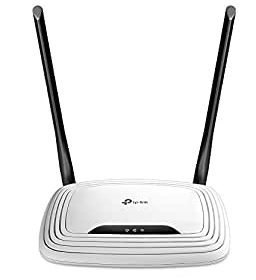
TP-Link N300 TL-WR841N
- MIMO 2T2R
- 2.4GHz band
- 300Mbps
- WIFI 802.11n
The king of kings when you go to buy a really cheap WIFI router. Its Wi-Fi performance is very good and it usually costs less than 20 euros.
You will only get up to 300 Mbps with this model. It is something old. Keep that in mind.
Something bad? Its range of action is very small (less than 30 meters without many obstacles) and its web interface is not the best in the world, but we can forgive it perfectly. Really good price-quality.
Asus DSL-AC68U
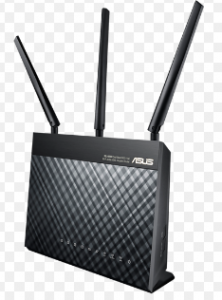
- WIFI 802.11a/b/g/n/ac 2.4GHz and 5GHz
- Integrated VDSL2 modem
- 1x USB 3.0, 1x Gigabit WAN, 4x Gigabit LAN
Asus put all the meat on the grill with this router, which has an integrated VDSL2 modem capable of supporting speeds of over 100 Mbps and is also not more expensive than its rivals. It’s not the fastest router, but it performs well in all situations.
It incorporates the AiRadar application that optimizes the intensity of the WIFI signal to increase coverage by 150%. We can also find the ASUS AiCloud application to connect to our network from any device.
Asus RT-AC86U
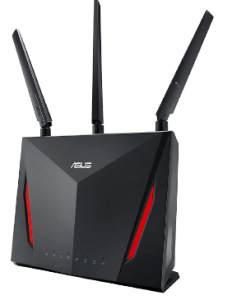
- Compatible with AiMesh (Whole Home Mesh Network Wi-Fi System)
- Triple-VLAN functionality, compatible with your operator’s triple-play services (Internet, IP Voice, and TV).
- WTFast game accelerator and Adaptive QoS
- AC2900 speeds with NitroQAM technology
- ASUS AiRadar and Range Boost help cover difficult areas, and MU-MIMO maximizes performance when connecting multiple devices.
- AiProtection with Trend Micro technology protects all connected devices
- 4 Gigabit LAN ports, Gigabit WAN, USB 2.0, USB 3.0
- Wi-Fi 802.11ac
If you want a more traditional router, but with the possibility of mounting a mesh system, this model may be the best option due to price clarity.
And especially if you want perfect performance for gaming, without paying the savagery that these types of routers for video games usually cost.
The speed of the network is going to be really good and the same is going to happen with the coverage thanks to its antennas.
The firmware is somewhat more complicated than in the previous model, but it has the advantage that you will be able to configure your entire network to your liking. The options are endless.
ASUS RT-AX88U

- Triple-VLAN functionality, compatible with your operator’s triple-play services (Internet, IP Voice, and TV), offers automatic management of IP addresses, server, and OpenVPN client
- 802.11ax Dual Band AX6000 Wireless Router with support for MU-MIMO and OFDMA technologies,
- Trend Micro AiProtection Pro security, wtfast Gaming Accelerator, and Adaptive QoS.
- High-speed Wi-Fi: 6000 Mbps for maximum performance in home networks
- 4 antennas and 8 LAN ports to connect more clients at the same time
If you are looking for a gaming router with the new WI-FI 6, this ASUS model may be the one.
The latest 802.11ax Wi-Fi standard on this Asus router offers support for 160 MHz bandwidth and Wi-Fi speeds of up to 6,000 Mbps, with speeds of 1,148 Mbps on the 2.4 GHz band and 4,804 Mbps on the 5 GHz band.
According to Asus, the RT-AX88U provides up to 80% more coverage than previous-generation routers.
ASUS ZenWifi XT8
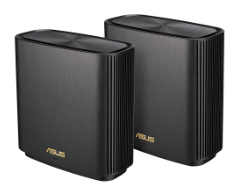
- Tri-band mesh network system that covers up to more than 500 square meters with a strong Wi-Fi signal and speeds of up to 6600 Mbps.
- 3-step setup and easy management with the Asus router app
- Free lifetime network security with trend micro technology guarantees
parental controls - WAN/LAN port 2.5 Gigabit, 3 Gigabit LAN ports, QoS
- Compatible with aimesh: combine zenwifi with other routers that support aimesh to create a powerful and flexible wifi system
Asus’s entry into the WIFI Mesh world together with Wi-Fi 6. Nothing is going to come cheap. It offers amazing speeds and its configuration is really flexible, especially if you already have an Asus router in your house.
You can even configure two networks 2.4 and 5 GHz. Security is guaranteed. If they included 3 routers it would be the perfect offer. It is a bit expensive.
Linksys Velop

- Provide Wi-Fi coverage to your entire home with an easy, guided setup using the Linksys App on an iOS or Android device
- Tri-band wireless technology that delivers fast transfer speeds to more devices on your network
- Speed: single node achieves more than 100 Mbps
- Connectivity: 2 x Gigabit Ethernet per unit (1 WAN and 1 LAN each)
- Dual-stream (2×2), 802.11ac networks; Quad-core 716 MHz ARM Cortex A7 processor
Another perfect option for large houses, especially if you buy a pack of three.
Perfect to have WIFI coverage throughout your house or chalet. An option designed to be installed easily and provide coverage to the entire house.
In 5 minutes you have everything installed with the app that you have to download on your smartphone. You can buy 1 node, 2 nodes, or 3 nodes.
Do you hit? You have to place the nodes correctly in good positions in your house for them to work well. It is a bit expensive.
Final Words
These are the Best Wireless Router for Fiber Connection. We hope that you find the perfect router for you.