

Do you want to know which is the best router to set up your home office or to provide WIFI coverage in your company?
Are your whole family at home and you have to cover many devices throughout the day? Are you teleworking?
Whether you want to set up your home office because you are self-employed or if you need a good router to use in the facilities of your small business, we are going to discuss several models that will not disappoint you.
Best Router for Work from Home
At this time when we are connected to the internet all day, it is very important to buy a good WIFI router.
Normally the one that the telephone operator usually leaves us is not very good, and although that does not usually matter if it is the one in your house, for your work it is key to have a good device that provides us with the best specifications.
What should you look for in this type of router?
Priorities often change: you need more security, remote access, being ability to use a good VPN, WAN redundancy, more connectivity options, and better connection speed.
Asus RT-AC88U

- AiMesh compatible: Connect compatible ASUS routers and create a versatile whole-home mesh Wi-Fi system
- Triple-VLAN functionality, compatible with triple-play services (Internet, IP Voice, and TV) from your operator, offers automatic management of IP addresses, OpenVPN server, and client
- Ultra-fast 802.11ac Wi-Fi router with a combined dual-band data rate of up to 3167 Mbps for low-latency online gaming, 4K/UHD video streaming, and fast file sharing
- Broadcom NitroQAM technology with up to 2167 Mbps on the 5 GHz band and up to 1000 Mbps on the 2.4 GHz band
- 4×4 antenna design with AiRadar technology for adequate coverage
- 1.4GHz dual-core processor improves USB and WAN/LAN speed
- Link Aggregation with up to 2 Gbps wire speed for faster access with more devices
It is a perfect router for gaming, but for that very reason, it is perfect for providing coverage to many devices in a house.
In addition, the firmware allows you to configure many parameters. security, something perfect to have a secure network for your work.
It gives you Dual Band, MU-MIMO huh? Translated: With the Dual Band you get two WIFI channels, one in 2.4GHZ and the other in 5GHz so you can connect some devices to one of the networks and others to another (there is no traffic jam in your network).
MU-MIMO allows a Wi-Fi router to communicate with multiple devices simultaneously. Perfect if there are a lot of people hanging out at home, right?
Those four antennas will allow you to give WIFI to a fairly large house. It is very easy to install.
Netgear R6400
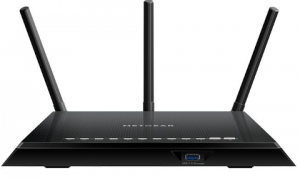
- 2 USB 2.0/3.0 ports and 4 Gigabit Ethernet ports
- Includes “ReadyShare” to share a printer or hard drive on a local network
- Includes “Genie” Software with multiple applications to manage and control the network efficiently
- (parental control, choice of WiFi channels)
- Dual Band
- AC1750 Wi-Fi (450+ 1300 Mbps)
Dimensions: 285 × 184.5 × 50mm
If you work most of your time online, this AC1750 Netgear R6400 router is the best option.
It’s fast and works great over long distances, so you can take a walk around the house and work from your bedroom if you want a change of scenery.
It offers features typically found in much more expensive routers, such as a VPN server to provide a secure connection to the network, QoS to prioritize traffic for certain apps, and support for Apple Time Machine.
It also features a faster USB 3.0 port for connecting NAS devices. And best of all: it never gives problems. It is not the cheapest model, but it is the best for your office.
If you don’t need that much speed, you can opt for the TP-Link Archer C7 which costs a little less and offers the best performance/price.
Linksys Velop

- Provide Wi-Fi coverage to your entire home with an easy, guided setup using the Linksys App on an iOS or Android device
- Tri-band wireless technology that delivers fast transfer speeds to more devices on your network
- Speed: single node achieves more than 100 Mbps
- Connectivity: 2 x Gigabit Ethernet per unit (1 WAN and 1 LAN each)
- Dual-stream (2×2), 802.11ac networks; Quad-core 716 MHz ARM Cortex A7 processor
Another perfect option for large houses, especially if you buy a pack of three. An option designed to be installed easily and give WIFI coverage to the whole house.
Parents can work on their computers in the living room while the children connect to their online video games or tablets via WIFI.
In 5 minutes you have everything installed with the app that you have to download on your smartphone. You can buy 1 node, 2 nodes, or 3 nodes.
Do you hit? You have to place the nodes correctly in good positions in your house for it to work well. It is a bit expensive.
Asus ROG Rapture GT-AX11000
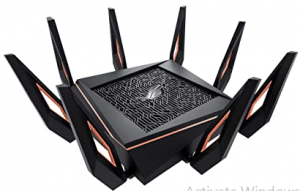
- AX11000 tri-band WiFi 6 (802.11ax) gaming router
- 10 Gigabit Wi-Fi router with a quad-core processor, 2.5G gaming port, DFS band, wtfast, adaptive QoS
- High-speed Wi-Fi: 11,000 Mbps for maximum performance on busy networks
- With the acceleration of game traffic between your device and the game server
- With a 1.8 GHz quad-core CPU and a 2.5GBase-T port
- Ports: 1 x WAN, 4 x 1-Gbps LAN, 1 x 2.5-Gbps LAN, 2 x USB 3.0
The next generation of gaming routers… and its price says it all: it’s quite expensive.
It has WIFI 6, it can be customized to infinity and beyond, and it has a spectacular 2.5GBase-T port. Little more can be asked for except a lower price.
The design is still amazing: it has 8 antennae and looks like an alien spaceship…evil. The WIFI connectivity it provides is perfect for very large houses, even for people who live in a chalet.
TP-Link RE650 AC2600
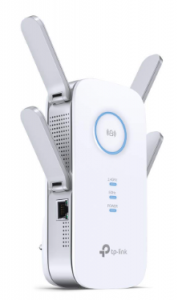
- Repeater with four external antennas with coverage of up to 100 square meters
- AC2600 Dual Band Wi-Fi: 800Mbps on 2.4GHz + 1733Mbps on 5GHz simultaneously
- Gigabit Ethernet port
- Compatible with any Wi-Fi Router
A true beast perfect for expanding any WIFI network with all its power.
It has a dual-band and Ethernet port and 4 beautiful antennas that serve what they are designed for: extend WIFI coverage in a large house of 100 square meters.
Dual-band and MU-MIMO make this extender the perfect gadget to give WIFI to multiple devices at the same time.
It can be configured to extend an existing WIFI or to create a new WIFI network from the ethernet connection. It does not have WIFI 6, but the protocol is not yet widespread.
TP-Link TL-PA7010P KIT
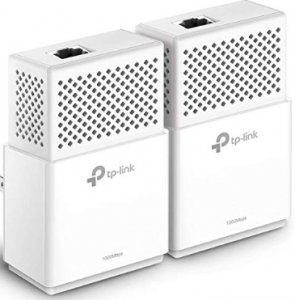
- Av1000 gigabit: with gigabit port up to 1000 Mbps
- Extra plug
- It is configured simply by pressing a button
- Compatible with any product with HomePlug av2 standard
- Energy saving that reduces power consumption by up to 85%
Perfect for the new 600mbps fiber connections. You plug them into two ends of your house via the plug, plug in a couple of ethernet cables, and you’re all set. Easier impossible. You have to try it.
The perfect solution for streaming in high resolution or gaming or simply to work anywhere in your home and have access to the network.
You just have to take a few things into account for it to work correctly: connect them directly to the wall socket (that it is the same type in both cases and that it is at the same height) and that the ethernet cable you use is of quality.
The electrical installation of Lucas must be in good condition.
An energy-saving standby mode can be set using a program for Windows and Mac. It is enabled by default.
Final Words
This is all about Best Router for Work from Home. We have reviewed the routers with no bias. So, just choose the one which suits your requirement.