
Do you need a good WIFI adapter for your computer? Has your hardware become outdated and you don’t want to change the internal components of your computer?
Do you need to update the WIFI protocol to a more modern one? We are going to recommend the best WIFI adapters of the moment to connect wirelessly to your router.
Best Wi-Fi Adapters
3 benefits of using a WIFI adapter:
You will not need to install new hardware in your computer: Internal wifi adapters are present in all computers, but sometimes it is better to use an external one because it gives you access to the latest WIFI standard or simply because the internal one has been damaged.
You will avoid connecting your computer through ethernet cables: you do not need to be near the router and connect your PC through an ethernet cable.
You can also connect multiple devices at the same time with multiple adapters.
WIFI adapters can be used in various devices: you simply have to connect them to the different USB ports of each device, so they are quite convenient in most situations.
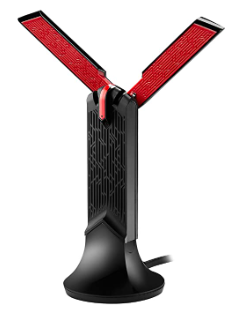
ASUS USB-AC68

- Upgrade the connectivity of your laptop or desktop with Wi-Fi AC1900 Dual-Ban
3×4 MIMO antenna design with 2 external antennas and the signal reception improvements of ASUS - AiRadar technology
- USB 3.0 interface for 10 times faster data transfers
- Includes support to place it where there is a better reception of the signal
- Adjustable antennas depending on the device to which it is connected
If you want to update the WIFI connection of your computer, this WIFI adapter is perfect, especially for gaming. It is also perfect for expanding WIFI coverage in large houses.
The antennas can be placed in various positions and it has a capacity of 600 Mbps in the 2.4 GHz band and 1,300 Mbps in the 5 GHz band.
They include ASUS AirRadar beamforming, 3×4 MIMO antennas, and a detachable USB cradle. The device is not cheap, but the connection you are going to get is really good. The USB cable is a bit thick.
TP-Link TL-WN823N

- Compatible with Raspberry Pi, Windows 10/8.1/8/7/XP, Mac OS X 10.7-10.11, Linux
- 300Mbps Wi-Fi
- mini size design
- You turn a wired internet connection on a PC or Laptop into a Wi-Fi hotspot
- Easily set up a secure wireless connection with the push of a WPS button
One of the best options for a quality price. It usually costs less than 10 euros and offers you really acceptable speeds of up to 300Mbps and advanced MIMO technology.
Do you hit? It’s just USB 2.0 and it won’t amplify the WIFI signal (it doesn’t have big antennas).
It is a perfect device for what it is: to get WIFI connectivity with a really small device that you can take everywhere.
Alfa Network AWUS036NHA

- Speed up to 150Mbp
- WIFI 802.11b/g/
- RP-SMA connector and Atheros AR9271L chipset
And this adapter? It is specifically designed for pentesting activities, that is, computer security.
Its chipset is compatible with distributions such as Kali Linux and other computer security distributions. Accept monitor mode. That’s why we recommend it here.
You are going to connect it to your virtual machine or Linux computer and you are not going to have any problem recognizing the hardware. For other uses, it is not recommended.
It’s a cheap device, it has a good range and it’s really reliable.
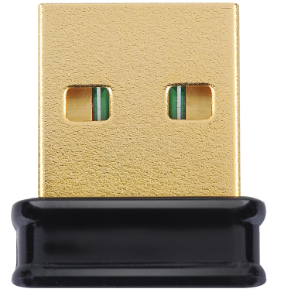
Edimax EW-7811UN
- Supports WP-compatible setup
- Support data rate up to 150Mbps
- Compatible with Wi-Fi standards 802.11 b/g/
- Compatible operating systems: Windows XP/ Vista/ 7/ 8/ 10, Linux, Mac OS
Another cheap and perfect product to establish WIFI connections without too many pretensions. It achieves speeds of 150Mbps on 802.11n networks and is backward compatible with 802.11b/g.
It does not support 5GHz networks but it offers 64/128-bit WEP encryption and support for WPA-PSK, WPA2-PSK, and WPS. It’s just USB 2.0.
But where this little adapter really stands out is its great energy efficiency.
TP-LINK Archer T2U

- Compatible with 256QAM technology increases 2.4GHz data rate from 150Mbps to 200Mbps for 33% faster performance
- Speeds of 200Mbps on 2.4GHz and 433 Mbps on 5GH
- Dual Band Wireless – 2.4 GHz and 5GH
- Small and discreet design
- Support Windows 10/8.1/8/7/XP, Mac OS
- Advanced security, supports 64/128-bit WEP, WPA/WPA2, and WPA-PSK/WPA2-PSK encryption standards
Possibly the best option as a nano adapter. There is nothing as small and as good as this model. It’s not as powerful as larger devices, but it holds it’s own very well.
This adapter can be used as a hotspot and is perfect for use on public WIFI networks.
Final Words
If routers and adapters with WIFI a/b/g/n were recommended before, now we have gone to WIFI ac (WI-FI 5), and soon we will have to look for routers with the new WI-FI 6 (IEEE 802.11ax ).
eye! You always have to analyze what is the WIFI standard that your different devices accept and what are you going to use the adapter for, if you only want it to surf the internet a bit and make inquiries, you don’t need to have the latest protocol available either.
The biggest advantages of WIFI ac are that it offers a better range and higher theoretical maximum speeds.
Wireless WiFi AC uses the 5GHz band for its transmissions, a band that usually has fewer connected devices, experiences less interference than 2.4GHz, and therefore reaches higher speeds.
The biggest advantages of WI-FI 6 are that it offers higher theoretical maximum speeds in environments with many WIFI networks, greater capacity, and performance (at the moment the first routers with this technology are beginning to emerge):
Wi-Fi 6 will provide increased capacity, coverage, and performance, even in dense environments like stadiums and other public places.
Wi-Fi 6 networks allow less battery consumption in devices, which makes it a solid option for any environment, (smart home or IoT).