
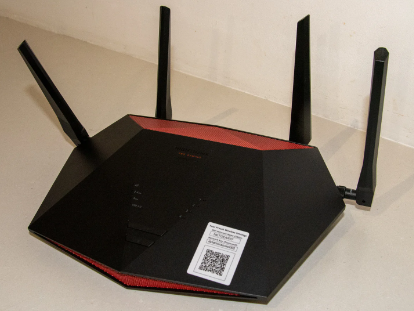
What are the best gaming routers in 2022 for a quality price? If you are thinking of playing your favorite video game online, you may need to change your router and choose a good gaming router.
Brands like Asus, TP-Link, D-Link, or Netgear have very good options. Perfect models for online games on PC, PlayStation, Xbox, or Nintendo Switch.
Why? These types of routers have been designed to prioritize the bandwidth of your connection to connect online to your games thanks to a feature they have: Quality of Service (QoS): if there is someone watching movies online or surfing the Internet on your network, your connection is not affected.
WIFI or cable? Definitely wired. You will always have a better connection to the streaming of your video game if you connect to the router by means of a cable thanks to a Gigabit Ethernet port.
But just in case you cannot connect via cable, make sure that the router has the latest Wi-Fi technology, at least 802.11ac, and better with the new Wi-Fi 6.
With that said, we’re going to recommend the best gaming routers you can buy right now.
Best Gaming Routers
If you are worried about what you should know to make a good purchase, you just have to take into account the following things:
Internet speed: The higher it is… the better. You have to contract a good speed with your operator and then have a good router that supports it.
Wi-Fi connectivity: it is very important, if you are going to play wirelessly, that the router offers great Wi-Fi connectivity with several bands and with traffic controls (streaming, downloads, gaming…).
Processing speed and RAM memory: for multiplayer games, it is important that the router’s processor and RAM are powerful and abundant.
With USB port: to connect a hard drive and use it as external storage connected to your private network.
Coverage: if you want to play anywhere in your house, you will need a router with good antennas that offer good coverage… or you will have to set up a Wi-Fi mesh system.
MU-MIMO: A feature that allows multiple devices to connect at the same speed.
Tri-band router (one 2.4GHz band and two 5GHz bands) or Dual-band (2.4 GHz and 5 GHz): Some routers allow you to dedicate a Wi-Fi band exclusively for gaming. Perfect for connecting many devices at the same time.
Good LAN and WAN ethernet connection: you can read How to choose and buy the best Ethernet cable.
If you are looking for a router that will serve you for everything, you can consult the entry: The best wireless Wi-Fi routers. You have more options.
ASUS RT-AX88U
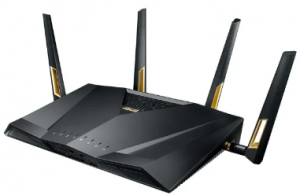
If you are looking for the best gaming router with the new Wi-Fi 6, this ASUS model may be the one. You can rate this model or the previous one depending on your physical connection needs.
The Asus RT-AX88U is somewhat more expensive. It was the first Wi-Fi 6 router developed by the Taiwan brand.
In its favor, it has the presence of 8 LAN ports, compared to 5 of the Asus RT-AX86U, but it does not have the 2.5G/1 Gbps port. It is much bigger. The Asus RT-AX86U offers better Wi-Fi 6 performance.
- Triple-VLAN functionality, compatible with your operator’s triple-play services (Internet, IP Voice, and TV), offers automatic management of IP addresses, server, and OpenVPN client
- AX6000 Dual Band 802.11ax Wireless Router with support for MU-MIMO and OFDMA technologies, Trend Micro AiProtection Pro security, wtfast Gaming Accelerator, and Adaptive QoS
- High-speed Wi-Fi: 6000 Mbps for maximum performance in home networks
- 4 antennas and 8 LAN ports to connect more clients at the same time
- It is a somewhat expensive router, but if you want the best for gaming, its price is more than justified.
The latest 802.11ax Wi-Fi standard on this Asus router offers support for 160 MHz bandwidth and Wi-Fi speeds of up to 6,000Mbps, with speeds of 1,148 Mbps on the 2.4 GHz band and 4,804 Mbps on the 5 GHz band.
According to Asus, the RT-AX88U provides up to 80% more coverage than previous-generation routers. Adaptive QoS works great.
Speeds on the 2.4 GHz band are adequate if not exceptional, but on the 5 GHz band, this router shines like the sun. You won’t find anything better.
TP-Link Archer C5400X

- Quad-Core A 64-bit 64 GHz CPU, three coprocessors, and 1 GB of RAM
- QoS engine with Game Mode to keep the connection fast
- Wi-Fi Tri-band up to 5400 Mbps in a 2.4 GHz Band (1000 Mbps) and DOS 5 GHz (2167 Mbps)
- WIFI with beamforming and VPN
- Connectivity: 1 Gigabit Ethernet WAN, 8 Gigabit Ethernet LAN, 2 USB 3.0
Another gaming router with a spectacular design that has perfect hardware for playing video games. And as you can see, you will not have Wi-Fi coverage problems in your home with so many antennas.
The performance is spectacular… nothing else can be said, just like its range of coverage… but its price is still high. It’s his only drawback.
In addition, it has 8 Ethernet ports, more than enough to connect all your devices via Ethernet cable and supports MU-MIMO and Tri-band.
It is capable of prioritizing traffic, has protection against online threats, and you can easily configure your VPN on the device.
TP-Link Archer AX11000
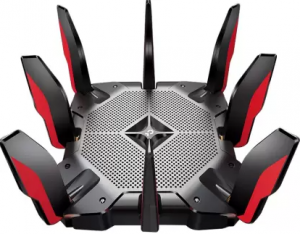
- Tri-band Wi-Fi Router: Wi-Fi speed above 10Gbps: 4804 Mbps (5GHz gaming) + 4804 Mbps (5GHz) + 1148 Mbps (2.4GHz)
- With game accelerator
- With Trend Micro protection
- With game statistics
- 1 x 2.5Gbps WAN port and 8 Gigabit LAN ports, 2 x USB 3.0 Type A and C ports
- 1.8GHz 3-core quad-core processors
- With OFDMA technology that increases speed and reduces latency.
If you want the Wi-Fi 6 version, this is the option you are looking for. Be prepared to pay good money, but you are going to get a great router in every way.
If you have a house of more than 120 square meters, this is one of the best options to cover your entire home with its Wi-Fi in three bands. It competes directly with the ASUS GT-AX11000 ROG Rapture that comes after it.
You will be able to prioritize your games and protect your entire network with its functions.
Netgear Nighthawk XR500

- With DumaOS software that optimizes the Internet connection
- Quality of Service to assign bandwidth to your games
with VPN - 2.6 Gbps Wi-Fi, 4 Gigabit Ethernet ports, 2 USB ports, and a 1.7 GHz dual-core processor
A good option that has dropped a lot in price, so it’s time to get hold of it. It only has 4 LAN ports, while other models have up to 8.
Its DumaOS offers many perfect options for gaming such as Geo-filtering, bandwidth control, or QoS to focus all the power of our connection on gaming.
The 2.4GHz band works great in terms of speed, and not so much the 5GHz band.
NETGEAR Nighthawk XR1000

- With WiFi 6 dual-band
- With DUMAS 3.0 enjoy online games faster
- GEO FENCING: Customize and filter the servers you play on Ping your favorite game servers to display your connection quality to each server on a world map.
- With Gigabit Ethernet to WiFi, 5 ports 5 (1 WAN & 4 LAN)
- 1.5Ghz Triple-core processor
The Wi-Fi 6 evolution of the previous router. It raises a little pricey but not as much as in other options. It only has dual-band, but its price is not as high as the top Gaming routers.
The software is improvable, but it improves with the different updates.
ASUS GT-AX11000 ROG Rapture

- AX11000 Tri-Band Wi-Fi 6 (802.11ax) Gaming Router
- 10 Gigabit wifi router with a quad-core processor, 2.5G gaming port, DFS band, wtfast, adaptive QoS
- High-Speed Wi-Fi: 11,000 Mbps for maximum performance on busy networks
- With the acceleration of game traffic between your device and the game server
- With a 1.8 GHz quad-core CPU and a 2.5GBase-T port
- Ports: 1 x WAN, 4 x 1-Gbps LAN, 1 x 2.5-Gbps LAN, 2 x USB 3.0
The next generation of gaming routers… and its price says it all: it’s pretty expensive. It has WIFI 6, can be customized to infinity and beyond, and has a spectacular 2.5GBase -T port. Little more can be asked except for a lower price.
This router is also one of the most versatile models. It is not only for gaming, it is also perfect for streaming or transferring files.
But the best part is that the router allows users to dedicate a 5 GHz band just for gaming. Nothing will interrupt your game.
The design is still amazing: it has 8 antennas and looks like an alien spaceship… evil. The wifi community it provides is perfect for very large homes.
Netgear RAX200

- With Wi-Fi 6 Triband AX11000 (up to 1200 + 4800 + 4800 Mbps)
- 12 simultaneous Wi-Fi streams
- Works with all carriers and connections
- Nighthawk App: Quick and easy setup and management
- Secure network thanks to WPA2 wireless security protocols, guest access network, DoS, firewall, VPN, etc.
- 2 USB 3.0 ports, 4 Gigabit Ethernet LAN ports; 2.5G Ethernet ports
- Dual-core processor, 2 amplified antennas, Beamforming+, Smart Connect, OFDMA, Amazon Alexa voice commands.
You’re not just taking home a gaming router, you’re almost taking home a plane, or at least it seems that way.
It is not a cheap router either, but it is worth it if you want to take advantage of all the bandwidth of your connection.
It has 4 antennas and can cover more than 40 devices at the same time.
Tri-band Wi-Fi adds an additional 4.8 Gbps speed band, increasing the total speed to 10.8 Gbps. Coverage reaches up to 320 m².
It is not specially designed for video games, but it is clear that it is very capable of managing the bandwidth so that our games work perfectly. It even has parental controls.
You will always maintain a very stable Wi-Fi connection and it has enough ports for all your devices.
D-Link DIR-X1560
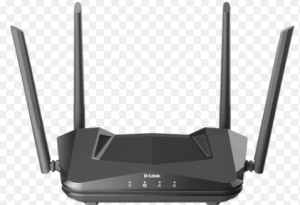
- With Wi-Fi 6: Increase coverage and connection quality with many users
- Dual-band with a combined speed of 1500 Mbps and MU-MIMO technology
- WPA3 Wi-Fi network, the new encryption protocol for wireless networks
- 4 Gigabit (1000 Mbps) LAN and Internet connection ports
A cheap model for those who do not need the best features in a video game router.
The most remarkable thing is that it has Wi-Fi 6, so you will have a router for a while. You can configure the router with the D-Link app.
It performs well on the 5GHz band, but somewhat worse on the 2.4GHz band, so it probably won’t increase your Wi-Fi coverage much at home with lots of walls and walls.
It also has no USB or Multi-gigabit LAN ports. But it is one of the cheapest.
ASUS RT-AC88U
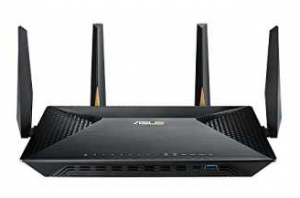
- Ultra-fast 802.11ac WiFi router with a combined dual-band data rate of up to 3167 Mbps for low-latency online gaming, video streaming up to 4K/UHD resolution, and fast file sharing
- Broadcom NitroQAM technology with up to 2167 Mbps on the 5 GHz band and up to 1000 Mbps on the
- 2.4 GHz band
- 4×4 antenna design with AiRadar technology to cover a larger area than ever before.
- Connectivity: 9x Gigabit Ethernet, 1x USB 2.0, 1x USB 3.0
- It has a 1.4 GHz dual-core processor that improves USB and WAN/LAN speed
- Link Aggregation with up to 2 Gbps wire speed for faster access with more devices
- Up to 4 times higher wireless capacity with MU-MIMO technology
Another beauty. What a good design. It looks like he’s going out to fight in an online video game, right?
Its high price is justified by the incredible 802.11ac WIFI performance it offers thanks to its antennas and NitroQAM technology.
Job? It requires that you buy the Asus PCE-AC88, a network card for your computer that will allow you to take advantage of its full potential.
Both the ASUS RT-AC5300 and this model two are very good options, and the main differences besides the price (the AC5300 is usually more expensive, although lately not much more expensive) are that:
WIFI: The AC88U is Dual – Band (1 x 5 GHz + 1 x 2.4 GHz); 802.11ac up to 3167 Mbps and the Ac5300 is Tri-Band (2 x 5 GHz + 1 x 2.4 GHz); 802.11ac up to 5334Mbps
LAN ports: The AC88U has 8 LAN ports and the AC5300 has only 4 LAN ports.
Also, the design is very different. The AC88U looks more like a traditional router and the AC5300 is kind of a spaceship with a very retro design that you can either love or horrify.
It also takes up more space. Inside the Hardware is practically the same. Both are compatible with connections from Movistar and the main operators.
You will be able to easily reach the speed of the fiber that you are currently installing (300/300 or even the next 600/600 or more).
Final Words
These are some of the best gaming routers. We have reviewed and mentioned all the features and specifications of the routers. Now, you have to just choose the perfect one for yourself.